Sharing a file from Apple devices to non-Apple devices like Android, or from Android to Apple devices, still has no easy built-in solution. But for Android devices, they have adopted Quick Share, which lets you easily share all your files to your other devices — it acts similarly to AirDrop, Apple’s default sharing feature.
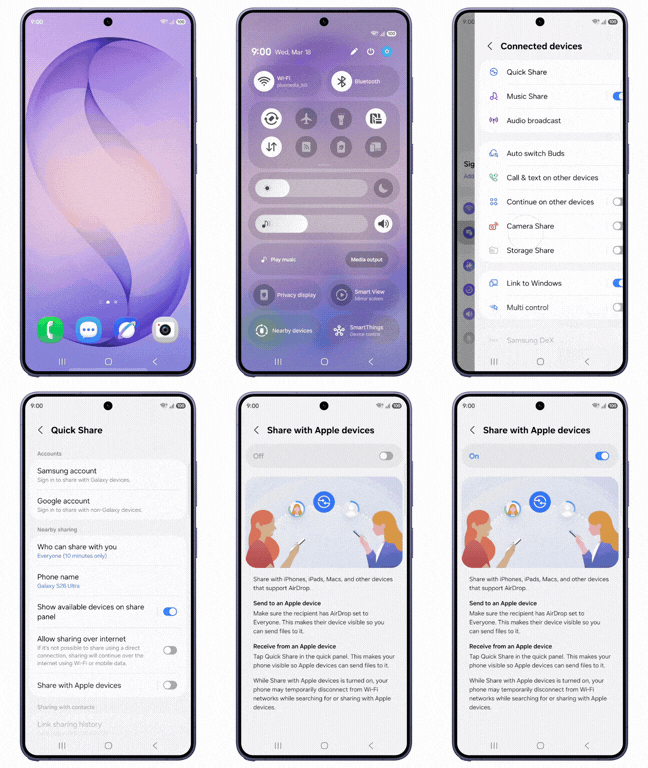
Samsung Quick Share Now Works with Apple Devices
Recently, we noticed that Android and Samsung have been working on making Quick Share more compatible with Apple devices. And this week, Samsung announced that Quick Share on their Galaxy devices is now able to share files directly with Apple devices. This is actually the second time we are seeing this kind of feature on Android — Google was the first to bring it to their Pixel 10 devices in late 2025, and now Samsung is following up with their Galaxy lineup.
The update first came with their newly launched Samsung Galaxy S26, and they say it will be rolling out to all their Galaxy devices through an OTA update soon. So if you don’t have the S26, keep an eye out for that update on your device.
How to enable it
One thing to know — this does not turn on automatically. You will need to go to Settings → Connected Devices → Quick Share and then toggle on the “Share with Apple devices” option. Once that is on, you are good to go and can start sharing files directly between your Galaxy and any Apple device.
Try LocalSend
If you don’t have a new Samsung Galaxy model, don’t worry — you can still share your files to Apple devices and even other devices like laptops and tablets. There is an application called LocalSend, which is a free and open-source application available on both the Google Play Store and the Apple App Store. What makes it even better is that it also works on Windows, macOS, and Linux, so basically any device you have. It has over 8 million downloads and uses end-to-end encryption, so your files are safe. You can download this application, share your files through it, and it works seamlessly offline as well — no internet needed.
Quick Share vs LocalSend — Which One Should You Use?
If you have a Samsung Galaxy device, Quick Share is the easiest option since it is already built in and you just need to enable one setting. But if you are on a different Android phone, or you want something that works across all your devices including laptops and computers, LocalSend is the better choice. Both are free and both get the job done well.
